Download C03-Advanced-EN.pdf
Download SLIDE-C03-Advanced-EN.pdf
Math
Math in Bash base
Arithmetic operations in bash can only be performed on integers.
$(( INT OPERATION_TYPE INT))

# Ex 1: simple addition
username@hostname:~$ echo $(( 2 + 2 ))
4
username@hostname:~$ foo=$(( 2 + 2 ))
username@hostname:~$ echo $foo
4
username@hostname:~$ echo $(( $foo + 2 ))
6
Math in Bash operation type
The operations type are :
-
addition :
+ -
substration :
- -
multiplication :
* -
division :
/
Round in bash math
Bash rounds the result of operations "down" to get an integer.
username@hostname:~$ echo $(( 9 / 3 ))
3
username@hostname:~$ echo $(( 10 / 3 ))
3
Bc
If you need to perform arithmetic operation with float you need bc with its scale option :
The syntax is as follows:
username@hostname:~$ echo "scale=3;10/3" | bc
3.333
username@hostname:~$ echo "scale=2;10/3" | bc
3.33
username@hostname:~$ echo "scale=1;10/3" | bc
3.3
Sequences
Sometimes it's usefull to generate a sequence of integer from a start to an end point.
You can use the seq command to do so.
Example :
username@hostname:~$ seq 1 10
1
2
3
4
5
6
7
8
9
10
The flows
Each process has 3 flows :
- The input stream "stdin"
- The standard output stream "stdout"
- The error output stream "stderr"
Stdin
This is an invisible but very useful feed. It's an input data of a command, generally from the keyboard or from another command.
Stdin (example)
Read from the keyboard gradually:
username@hostname:~$ sort << ENDSORT
> toto
> titi
> tata
> ENDSORT
tata
titi
toto
Terminal wait for some text. As long as the character string != keyword (here ENDSORT), continue.
All data sent to sort until ENDSORT keyword detected.
The result sort will be in its stdout. We can modify the stdout :
username@hostname:~$ sort << ENDSORT > file_sort.txt
Stdout
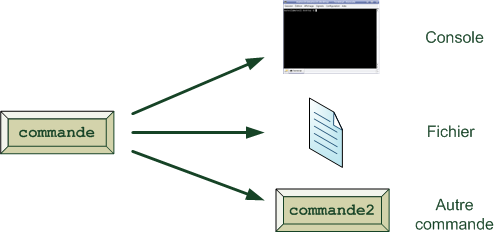
This is the most visible flow. By default, it will be displayed on the screen.
It is possible to :
- send it in a new file :
cmd > file - send it at the end of a file :
cmd >> file - send it to another command to make a chaining commands :
cmd1 | cmd2(the stdout of cmd1 will be the stdin of cmd2)
Stdout example (1/2)
username@hostname:~$ echo "this is my stdout"
this is my stdout
Stdout example (2/2)
username@hostname:~$ echo -e "toto\ntata" >> File.txt
username@hostname:~$ cat File.txt
toto
tata
username@hostname:~$ cat File.txt | grep "to"
toto
username@hostname:~$ cat File.txt | grep "to" | wc -l
1
Stderr
This is the flow that the terminal displays during an error. For this flow it is possible to :
- send it in a new file :
cmd 2> file - send it at the end of a file :
cmd 2>> file - send it to stdout :
cmd 2>&1 > fileorcmd &> file(the set of stderr and stdout will be in file)
Stderr (example)
username@hostname:~$ ls
File
Directory
username@hostname:~$ cat FileNotExist
cat: FileNotExist: No such file or directory
username@hostname:~$ cat FileNotExist 2> ./stderr.txt
username@hostname:~$ cat FileNotExist 1> ./stdout.txt
username@hostname:~$ cat stderr.txt
cat: FileNotExist: No such file or directory
username@hostname:~$ cat stdout.txt

username@hostname:~$
ReGex
The different types
ReGex allow you to match specifics patterns (like a phone number, an email address ...)
There are 2 types of regular expressions :
- Basic regular expressions (vi, grep, expr, sed) : ERb
- Extended regular expressions (grep -E, egrep, awk) : ERe
The keywords of the regex
- "^" = Start of line : "^toto"
- "\$" = End of line : "toto\$"
- "." = Any character
- "?" = 0 or 1 time the previous character or grouping : "?t"
- "*" = 0 to n times the previous character or grouping : "*t"
- "+" = 1 to n times the previous character or grouping : "+t"
- "\" = Protection of a special character
- "[list_of_chars]" = A quoted character in the list : "[a-z]" "[A-Z]" "[0-9]"
- "[^list_of_chars]" = A character that is not mentioned in the list : "[^0-9]"
- "(PATERN){n}" = Number of times of patern (ERe) : "(ti){2}"
Example of ReGex (1/3)
Let's take this text file as an example :
toto likes titi
Isen 2021
Toto likes titi
- Find lines that start with toto and end with titi
isen@isen : cat exampleRegex.txt
toto likes titi
Isen 2021
Toto likes titi
isen@isen : grep "^toto.*titi$" exampleRegex.txt
toto likes titi
Example of ReGex (2/3)
- Find lines that start with a capital letter
isen@isen : cat exampleRegex.txt
toto likes titi
Isen 2021
Toto likes titi
isen@isen : grep "^[A-Z]" exampleRegex.txt
Isen 2021
Toto likes titi
Example of ReGex (3/3)
- Find lines that contain "to" 2 times
isen@isen : cat exampleRegex.txt
toto likes titi
Isen 2021
Toto likes titi
isen@isen : grep -E "(to){2}" exampleRegex.txt
toto likes titi
Grep
Introduction
Grep command can be used to find or search a regular expression or a string in a text file.
Searching in a specific file
Searching the pattern "Toto" in the file exempleRegex.txt.
isen@isen : grep "Toto" exempleRegex.txt
Toto love titi
Totope
Searching recursivly
Searching the pattern "Toto" recursivly in all files in /home/isen directory and sub directory.
isen@isen : grep -r "Toto" /home/isen
Toto love titi
Totope
Toto hate titi
Ignore case sensitivity
Searching the pattern "toto" by ignoring case sensitivity in the file exempleRegex.txt.
isen@isen : grep -i "Toto" exempleRegex.txt
Toto love titi
Totope
toto tata
TOTo titi
Sed
Introduction
Sed is a command that allows manipulation of text file from regular expression.
By default sed displays the result in the stdout. To do the action directly in the file you need the option -i.
Substitution
Change one patern by another.
sed "s/PATERN_TO_LOOK_FOR/REPLACEMENT_PATTERN/"
isen@isen : cat exampleRegex.txt
toto likes titi
Isen 2021
Toto likes titi
isen@isen : sed "s/titi/loic/" exampleRegex.txt
toto likes loic
Isen 2021
Toto likes loic
Insert
Add a line before the wanted patern.
sed "/PATERN_TO_LOOK_FOR/iPATERN_TO_ADD/"
isen@isen : cat exampleRegex.txt
toto likes titi
Isen 2021
Toto likes titi
isen@isen :  sed "/Toto/iTiti" exampleRegex.txt
toto likes titi
Isen 2021
Titi
Toto likes titi
Append
Add a line after the wanted patern.
sed "/PATERN_TO_LOOK_FOR/aPATERN_TO_ADD/"
isen@isen : cat exampleRegex.txt
toto likes titi
Isen 2021
Toto likes titi
isen@isen :  sed "/toto/aTiti" exampleRegex.txt
toto likes titi
Titi
Isen 2021
Toto likes titi
Delete
Delete a line containing a pattern (by modifying permanently the file with -i option).
sed "/PATERN/d"
isen@isen : cat exampleRegex.txt
toto likes titi
Isen 2021
Toto likes titi
isen@isen : sed -i "/titi$/d" exampleRegex.txt
isen@isen : cat exampleRegex.txt
Isen 2021