Download C04-Practice-EN.pdf
Download SLIDE-C04-Practice-EN.pdf
How to have a beautiful source code
The return code
You have to control the return code ($?). In function you must use the command return <ReturnCode>, and in the main function you must use the command exit <ReturnCode>
Beware the return command immediately exits the function. The exit command terminates the script (even if the exit command is inside a function)
Check your input
However the input data is retrieved, it should always be checked.
- if a file must be read, it must already be known whether the file exists
- if you have to do an arithmetic operation, you have to know if it's numbers (pay attention to the division by 0)
- ...
A lot of checking exist in test command (see Comparison rules).
Indentation
Do you prefer this code :
function action () { echo -ne "${1}\t";shift;${*};rc=${?};\
[ ${rc} -eq 0 ] && echo '[OK]' || \
echo '[KO]';return ${rc};}
or this ?
function action () {
    echo -ne "${1}\t"
    shift
    ${*}
    rc=${?}
    [ ${rc} -eq 0 ] && echo '[OK]' || echo '[KO]'
    return ${rc}
}
I prefer the second script. The intention is a matter of taste. But it must at least be homogeneous throughout the script. remember to ventilate your code (an empty line is not expensive, but it makes the code more readable).
Comments
Add a lot of comments in your script. Why ?
- if you take your code after 6 months, you will understand it more easily
- if you give your code to someone else, they will understand it more easily
- the user of your code will understand these errors more easily
- ...
Script Construction
All project in test / production enivronement are based on requirement.
This requierments are necessary to ve sure that the final creation do what we/they want.
Requierement
this script aims to classify the former students present during a meeting
Here we ll create a script with this requierement :
-
The script name is : alumni-reunion.sh
-
The script must parse a csv file given in the first arguement
-
the csv file format is : NAME;SURNAME;YEAR;LEVEL (file path : /data/admin/list/student-list)
-
for each line in the csv file the script the script ask : "SURNAME NAME is present ? (y/n)"
-
The answer have to be y or n and you don't need to use Enter key to valid
-
The script have to create a directory with the date (ex : /data/admin/result/2022-09-27)
-
Each time the answer is y or n you have to append in the first arguement in a new file (dir path : /data/admin/result/YYYY-MM-DD/)
-
The results files are sorted by the group [year][level] (ex : /data/admin/result/YYYY-MM-DD/student-list_2020-M1) .
-
The format of the contents files is : NAME;SURNAME;YEAR;LEVEL;[here|absent]
-
The script end with a sumury for all created files and the sum of present/absent count (need a header : FILE | present | absent |
Algo
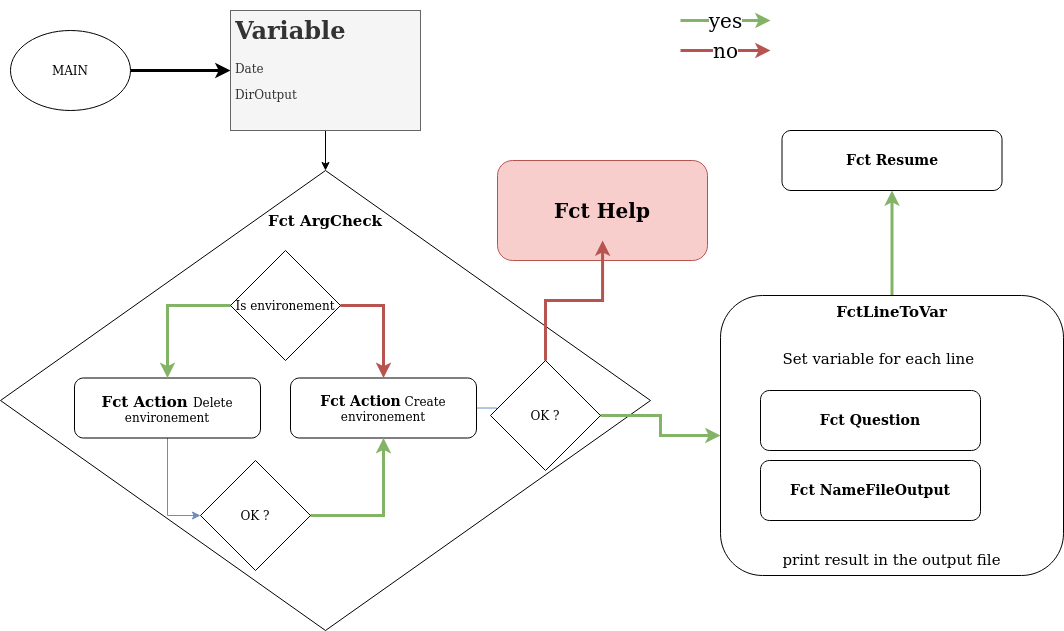
Classic Function
The classic functions needed in the script are the following:
-
Check or Action to verify each command
-
Help or Usage to print information about the script himself
-
ArgCheck to check the arguement or the type of arguement
Specific Function
We need for each script to analyse the requierments to translate each of them in a function or a bash code.
-
LineToVar : translate each column line in a specific variable (Name=[...] Surname=[...])
-
Question : ask to the user the question "SURNAME NAME is present ? (y/n)" and echo the result translated in STDOUT of the function
-
NameFileOutput : Create the variable output file /data/admin/result/student-list_YYYY-LEVEL with the data of LineToVar and the result of Question
-
Resume : Print all the created file with the sum of present/absent count (like : FILE : 12 2 )
Output
Output (First start)
isen@astier_g_client ~ $ ./alumni-reunion.sh list-student.csv

* Create environement /data/admin/result/2022-09-28 : OK
KADE Anthony is present ? (y/n) : y
LILIAN Giles is present ? (y/n) : y
[...]
ASIA Petty is present ? (y/n) : n

FILE                    |       present |       absent
-------------------------------------------------------------
student-list_2013-M2    |       0       |       1
student-list_2018-M2    |       1       |       0
student-list_2020-M2    |       1       |       0
-------------------------------------------------------------
TOTAL                   |       2       |       1
Output (restart)
isen@astier_g_client ~ $ ./alumni-reunion.sh /data/admin/list/student-list
/data/admin/result/2022-09-28 exist \
do you want to continue (delete all data) (y/n) : y
* Clean environement : OK
KADE Anthony is present ? (y/n) : y
LILIAN Giles is present ? (y/n) : y
[...]
ASIA Petty is present ? (y/n) : n

FILE                    |       present |       absent
-------------------------------------------------------------
student-list_2013-M2    |       0       |       1
student-list_2018-M2    |       1       |       0
student-list_2020-M2    |       1       |       0
-------------------------------------------------------------
TOTAL                   |       2       |       1
Function
REMINDER : ALL function have to be on the top of the script before the main !!!
Help
The Help function is only here to print information and exit. If something go wrong you can use this function to exit the script
# Print the help and exit
function Help() {
        echo "$(basename $0) [absolute or relative path file]"
        [[ ! -z $1 ]] && [[ $(let $1) ]] && Exit=$1 || Exit=0
        exit ${Exit}
}
Action
The Action function get 2 arguement :
- what we need to print
- The command to exec (no stdout/stderr)
# Print info exec and status
function Action () {
        # Print the first arguement without \n in the end (-n)
        echo -ne "\n\* $1 : "
        # Shift to the left
        shift
        # execute all the argument like a classic command but redirect in /dev/null
        $* &> /dev/null
        ResultExec=$?
        # Check the result and print OK/Failed
        if [[ ${ResultExec} -eq 0 ]]
                then
                        echo OK
                else
                        echo Failed; Help ${ResultExec}
        fi
}
Check
You can used Check or Action but Check is used differently.
function Check() {
        HaveToExit=$2
        [[ ${HaveToExit} -eq 1 ]] && $Help ${ResultExec}
        if [[ $1 -eq 0 ]]
                then
                        echo OK
                else
                        echo Failed
                        Help $1
        fi
}
# Exemple :
echo -n 'Is it OK ? : '
true
Check $? 0
ArgCheck
Check the environement :
- is the first arguement is a file
- is the output directory exist
- is the output directory creation is OK
function ArgCheck() {
        # Check the first arg of the script and directory output data
        [[ ! -f $1 ]] && echo "$1 is not a file" && Help 1
        if [[ -d ${DirOutput} ]]; then
        while [[ $Qans != "y" ]] && [[ $Qans != "n" ]]
            do
                echo -e "\n"
                read -p  "${DirOutput} exist \
do you want to continue (delete all data) (y/n) : " -n1 Qans
            done
        # Clean environement
        [[ $Qans == "n" ]] && exit || \
        Action "Clean environement" "1" rm -rf ${DirOutput}/*
        fi
}
NameFileOutput
Create the variable which contain the ouput file for each line of the input file
# Create the varname of the output file
function NameFileOutput(){
        FileName=student-list_${1}-${2}
        echo ${DirOutput}/${FileName}
}
Question
For each line in the input file we need to ask the question present/absent
function Question() {
        qName=$1
        qSurname=$2
        Answer=""
        Result=""
        # Check if the data is y or n
        while [[ -z ${Result} ]]
                do
                        read -p "$Name $Surname is present ? (y/n) : " \
            -n1 Answer </dev/tty
                        [[ ${Answer} == "y" ]] && Result=present
                        [[ ${Answer} == "n" ]] && Result=absent
                done
        echo $Result
}
LineToVar
Parse the all files, get data and call other function
# Analyse for all line
function LineToVar(){
        while read -r Line
                do
                        echo -e "\n"
                        # Gen variable environement for each line
                        Name=$(echo $Line | cut -d";" -f1)
                        Surname=$(echo $Line | cut -d";" -f2)
                        Year=$(echo $Line | cut -d";" -f3)
                        Level=$(echo $Line | cut -d";" -f4)
                        Result=$(Question "${Name}" "${Surname}")
                        OutputFile=$(NameFileOutput "${Year}" "${Level}")
                        # output data in the outputfile
      echo "${Name};${Surname};${Year};${Level};${Result}" >> ${OutputFile}

                done  < $1
}
Resume
Output the resume of all created output files
function Resume() {
        echo -e "\n\nFILE\t\t\t|\tpresent\t|\tabsent"
        echo  "-------------------------------------------------------------"
        # find all output file
        for FileOutput in $(find ${DirOutput} -type f \
                -name "student-list_*")
                do
                        # Gen variable for each file
                        FileName=$(basename $FileOutput)
                        Present=$(cat ${FileOutput} | grep present|wc -l)
                        Absent=$(cat ${FileOutput} | grep absent|wc -l)
                        TotPresent=$((TotPresent+Present))
                        TotAbsent=$((TotAbsent+Absent))
                        echo -e "$FileName\t|\t${Present}\t|\t$Absent"
                done
        echo  "-------------------------------------------------------------"
        # print total
        echo -e "TOTAL\t\t\t|\t${TotPresent}\t|\t$TotAbsent"
}
Main
Main call function and create some variable for all the scripts and functions
######## MAIN ########
Date=$(date "+%Y-%m-%d")

DirOutput=/data/admin/result/${Date}

ArgCheck $1

[[ ! -d ${DirOutput} ]] && \
Action "Create environement ${DirOutput}" "1" mkdir -p ${DirOutput}

LineToVar $1

Resume
Main and fucntion file
You can separate the main file and all function with source
#!/bin/bash

source $(realpath $(dirname $0))/fct_classic
source $(realpath $(dirname $0))/fct_specific

ArgCheck $1

[[ ! -d ${DirOutput} ]] && \
Action "Create environement ${DirOutput}" "1" mkdir -p ${DirOutput}

LineToVar $1

Resume